About Virtual Try-on
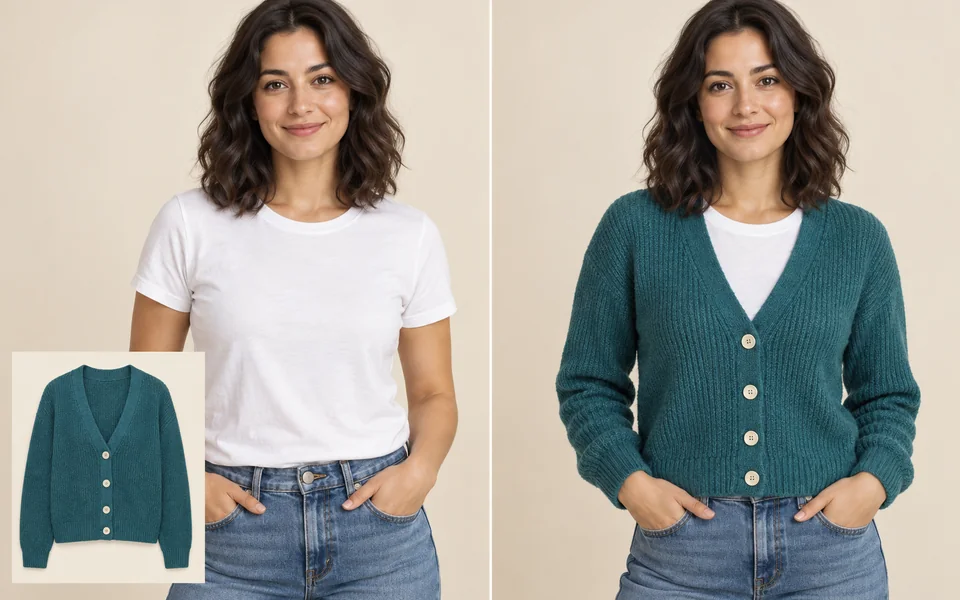
Two inputs: a full- or half-body photo of a person, and a flat shot of the garment. The model fits the garment to the pose and reconciles the lighting between the two. Busy prints benefit from a higher resolution setting.
Photo editing steps
Prepare your input, choose the edit and review the output before using it:
- Upload the person
- Upload the garment
- Read body shape and pose
- Fit the garment
- Unify lighting
- Export
How to Use Virtual Try-on
- Upload the person photo first.
- Upload the garment second.
- Choose a fit.
- Check cuffs and collar in the result.
Supported models
There is no Auto option for this task — pick a model explicitly.
| Model | Developer | Speed | Max output | Credits | Status |
|---|---|---|---|---|---|
| Seedream 5 Lite | ByteDance | Fast | 4K | From 3 | Active |
| Seedream 5 Pro | ByteDance | Balanced | 2K | From 4 | Active |
| Qwen Image Max | Alibaba | Balanced | 1K | From 6 | Active |
| Qwen Image 3 Pro | Alibaba | Balanced | 2K | From 3 | Active |
| Wan 2.7 Image Pro | Alibaba | Balanced | 4K text / 2K edit | From 4 | Active |
| Nano Banana 2 | Fast | 4K | From 5 | Active | |
| Kling Image O3 | Kuaishou | Balanced | 4K | From 2 | Active |
| Nano Banana Pro | Balanced | 4K | From 12 | Active | |
| GPT Image | OpenAI | Balanced | 4K | From 5 | Active |
When the recommended model is unavailable, the page asks you to confirm a switch. It never substitutes silently.
Output spec
- Format: PNG
- Notes: Person photo aspect ratio preserved
Frequently Asked Questions
Do prints stay intact?+
Large patterns generally survive; small lettering can still distort.
Can I change the model?+
Yes — swap the person photo for whoever you want.
Image handling and privacy
This is an AI tool: images you upload are sent to the configured inference service for processing, not handled locally in the browser. The active route is managed internally and is separate from the model developer. You can delete any generation from your history at any time.