About Old Photo Restoration
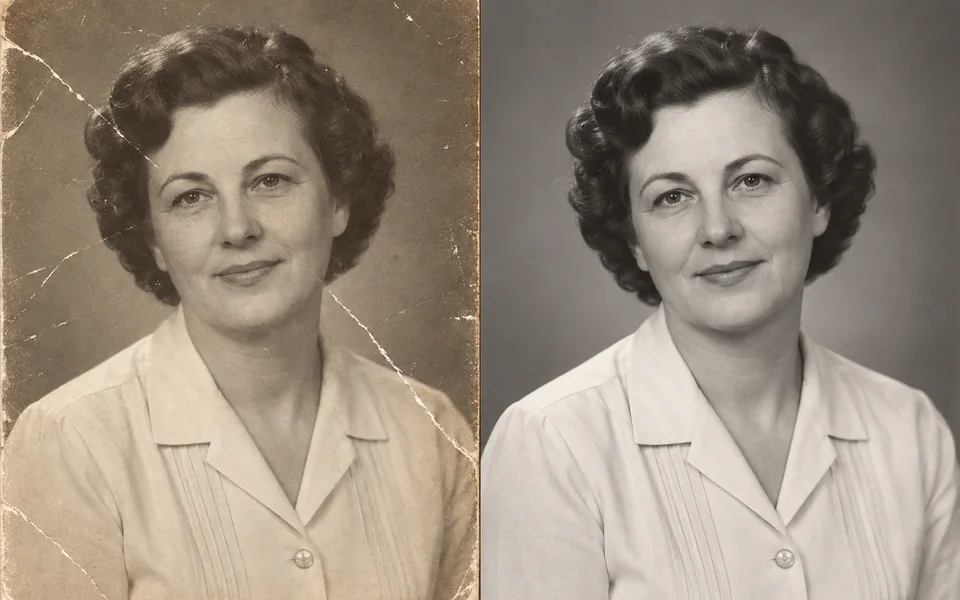
Photo restoration has one hard rule: it still has to be the same person. The Face Fidelity default leans towards preservation — a little residual softness is better than rebuilt features. Colourisation is inference, so clothes and background colours are plausible guesses, not facts.
Photo editing steps
Prepare your input, choose the edit and review the output before using it:
- Upload the old photo
- Remove scratches and noise
- Repair faces (fidelity first)
- Optional colourisation
- Upscale 2x and export
How to Use Old Photo Restoration
- Upload a scan — a flatbed scan beats a phone photo of the print.
- Turn on Colorize if you want colour.
- If the result does not look like the person, raise Face Fidelity and rerun.
- Export.
Supported models
There is no Auto option for this task — pick a model explicitly.
| Model | Developer | Speed | Max output | Credits | Status |
|---|---|---|---|---|---|
| CodeFormer | S-Lab, NTU | Fast | 2x | From 1 | Active |
| Nano Banana 2 | Fast | 4K | From 5 | Active | |
| Clarity Upscaler | Philz1337x | Balanced | 4x | From 1 | Active |
When the recommended model is unavailable, the page asks you to confirm a switch. It never substitutes silently.
Output spec
- Format: JPG / PNG
- Notes: 2x upscale
Frequently Asked Questions
Are the colours accurate?+
No, they are inferred. If you know the real colours, state them in the prompt.
Can it fix heavy damage?+
For large missing areas, run Object Remover on the damage first, then restoration.
Image handling and privacy
This is an AI tool: images you upload are sent to the configured inference service for processing, not handled locally in the browser. The active route is managed internally and is separate from the model developer. You can delete any generation from your history at any time.